Omarchy Plugin (GUI)
Hypr Input Switcher for Omarchy is the official visual rule management overlay plugin designed specifically for Omarchy 4.0+ (Quickshell).
It allows you to inspect, configure, and persist automatic input method switching rules for hypr-input-switcher in real time with 100% Pure Quickshell & JavaScript (Zero Python Dependency).
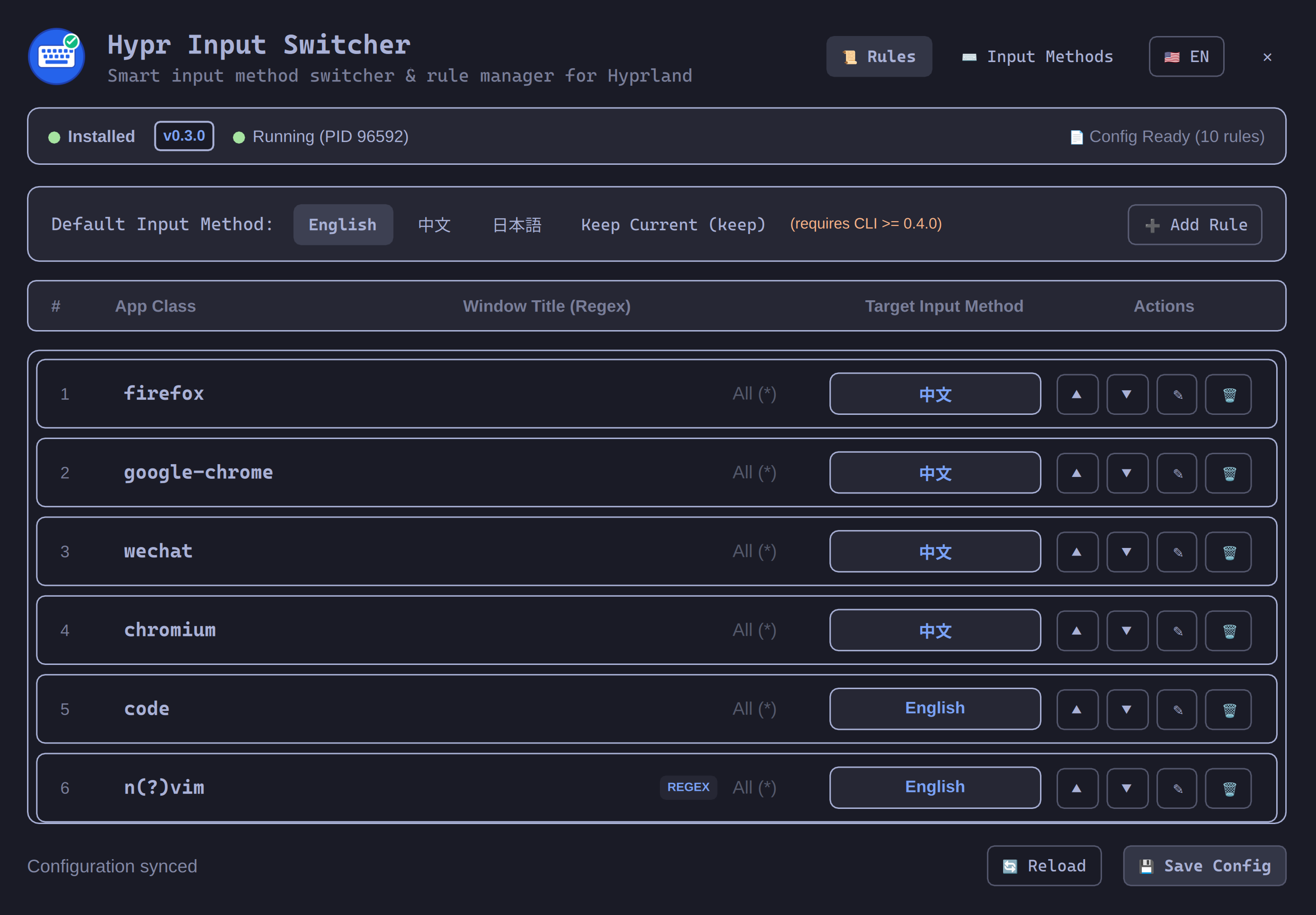
✨ Features
- 🪟 Visual Rule Management: Easily view, add, edit, reorder, and remove window rules (Class, Regex matching, Window Title, and Target Input Method).
- 🎯 Pure Native Window Picker: Click-to-pick any running window on screen (chaining
slurp+hyprctl) directly in Quickshell to auto-fill windowclassandtitle. - ⌨️ Input Method Management: Dedicated tab to manage supported input methods, display names, engine backends, and inline Rime schemas (e.g.,
rime_frost,jaroomaji). - 🔍 System Diagnostics Banner: Live status indicator displaying binary installation, version, daemon process state (with a one-click
▶ Start Servicebutton), and configuration file health. - ↕️ Rule Priority Reordering: Move rules up and down to match first-fit execution precedence in
hypr-input-switcher. - ⚙️ Default Input Method Switching: Switch global fallback input method behavior (
english,chinese,keep, etc.) on the fly. - 💾 Native Atomic YAML Sync: Powered by a bundled pure JavaScript YAML engine and
Quickshell.Io.FileViewfor instant atomic saves and hot reload with zero external runtime dependencies. - 🎨 Native Omarchy 4.0 Styling: Full integration with Omarchy
qs.Commonsandqs.Uitheme tokens, rounded cards, keyboard focus handling, and backdrop dismissal.
Prerequisites
Before installing the plugin, ensure you have:
- Omarchy 4.0+ running
omarchy-shell(Quickshell). hypr-input-switcherinstalled on your system (see Installation).slurp(installed by default on Omarchy) for visual window picking.
Installation
Method 1: Using Omarchy CLI (Recommended)
You can install the plugin directly with the omarchy package/plugin manager:
omarchy plugin install https://github.com/icyleaf/omarchy-hypr-input-switcher
Method 2: Manual Clone
Alternatively, you can clone the repository directly into your Omarchy user plugins directory:
git clone https://github.com/icyleaf/omarchy-hypr-input-switcher.git ~/.config/omarchy/plugins/icyleaf.hypr-input-switcher
Once installed, Omarchy will automatically detect and load the plugin. If needed, you can force a plugin rescan:
omarchy-shell shell rescanPlugins
# or restart the shell
omarchy restart shell
Usage
Opening the Overlay
You can trigger the Hypr Input Switcher configuration overlay in several ways:
-
Using Omarchy Shell Command:
omarchy-shell overlay toggle icyleaf.hypr-input-switcher -
Binding to a Hyprland Shortcut: Add a keybinding in your Hyprland configuration (
~/.config/hypr/hyprland.confor~/.config/omarchy/hypr/bindings.conf):# Toggle Hypr Input Switcher settings overlay
bind = SUPER SHIFT, I, exec, omarchy-shell overlay toggle icyleaf.hypr-input-switcher
Key Features Breakdown
🎯 Native Window Picker
Instead of manually running hyprctl activewindow to find the exact class name or title:
- Click the "Pick Window" crosshair icon in the rule dialog.
- The screen enters interactive selection mode via
slurp. - Click any target window.
- The window's
classandtitleare automatically populated into the form.
🔍 System Diagnostics & Service Control
The plugin actively monitors the health of hypr-input-switcher:
- Binary Status: Confirms whether the
hypr-input-switcherexecutable is present in$PATHand reports its version. - Daemon State: Checks if the background daemon process is running.
- One-Click Start: If the daemon is stopped, a convenient
▶ Start Servicebutton lets you launch it immediately. - Config File Health: Verifies that
~/.config/hypr-input-switcher/config.yamlis readable and valid.
↕️ First-Fit Rule Priority
hypr-input-switcher evaluates window rules in the order they appear in config.yaml. The Omarchy plugin lets you reorder rules with up/down arrows so more specific regex rules take precedence over broader matches.
💾 Atomic YAML Sync
The plugin reads and writes directly to ~/.config/hypr-input-switcher/config.yaml. Because hypr-input-switcher supports config hot-reloading (via --watch or file change detection), changes made in the GUI take effect immediately without requiring a daemon restart.
Source Repository
For source code, issue tracking, and contributions, visit: